
POWER HUBS
Topic cluster SEO you can check, not guess
A Power Hub is a pillar page plus 4 to 8 clusters, linked up, down and across. SEO411.AI reads every hub from your site map, runs six link checks on each one, lists the pages outside every hub with the hub they belong in, names the next content to write, and writes the missing links for you when you approve them.
Power Hubs is the structure Vertical Web has built client sites around for years. Shipped in the app in October 2026; see the What is new page.
WHY HUBS
Rankings follow structure, and structure can be measured
Google reads a site as topics, not as a list of pages. A page on its own, with no pillar above it and no siblings beside it, has to earn every ranking alone. A page inside a hub inherits the links, the anchors and the topical depth of the whole group. Most tools stop at a site map picture. Power Hubs turns the picture into a checklist with a pass or fail for every link, so the first hour of work goes to the link or the page worth the most.
The hubs feed the rest of the platform. The Content Scanner suggests links with the exact sentence and anchor inside the hub, the writer knows each page’s hub and links the draft into it, the keyword picker sends keywords with no page to Content Ideas with their hub named, and every report carries a Power Hub Scorecard. The full walk through the platform is on the features tour.
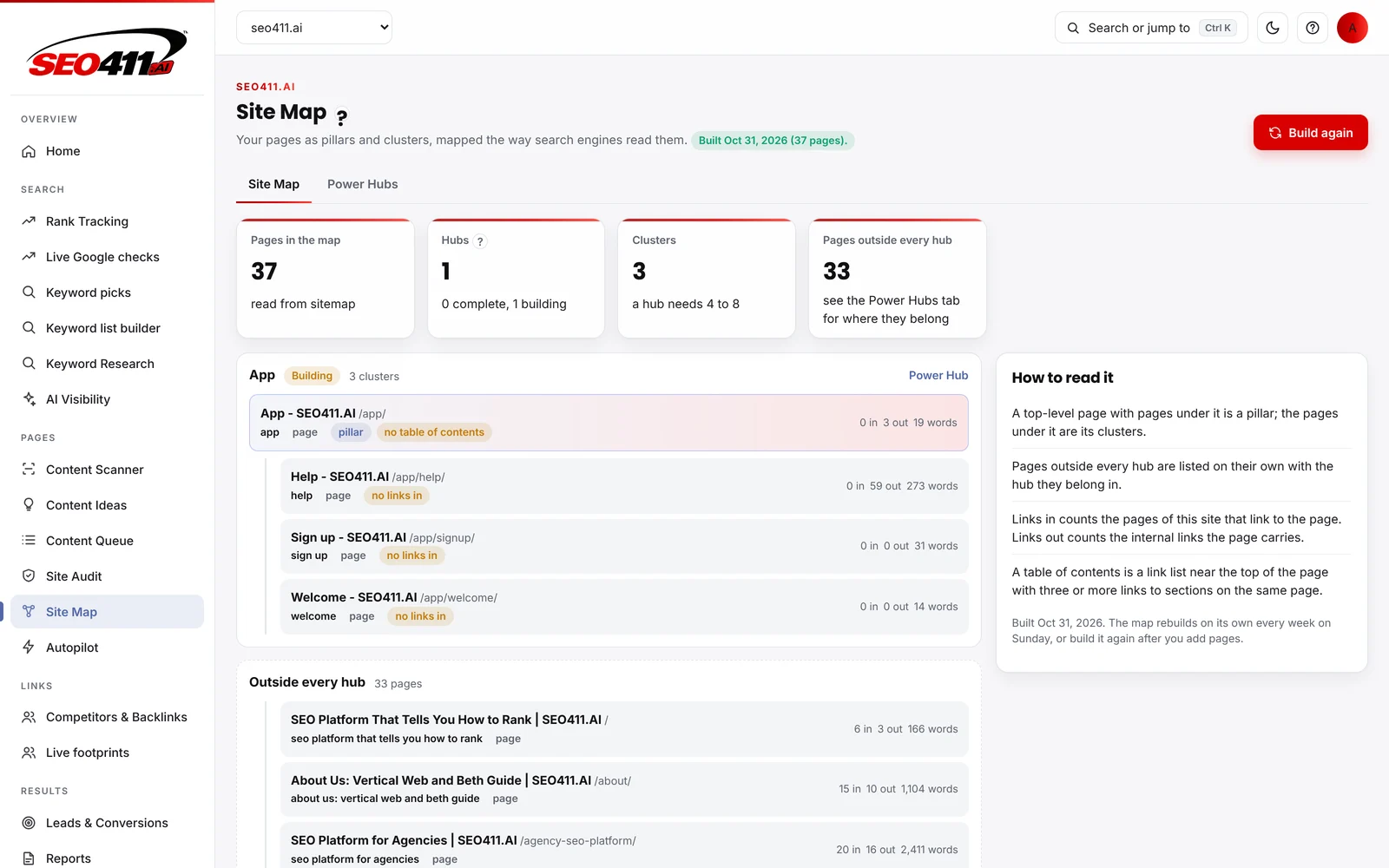
The Site Map
Pages in the map, hubs, clusters and pages outside every hub, read from the site itself.
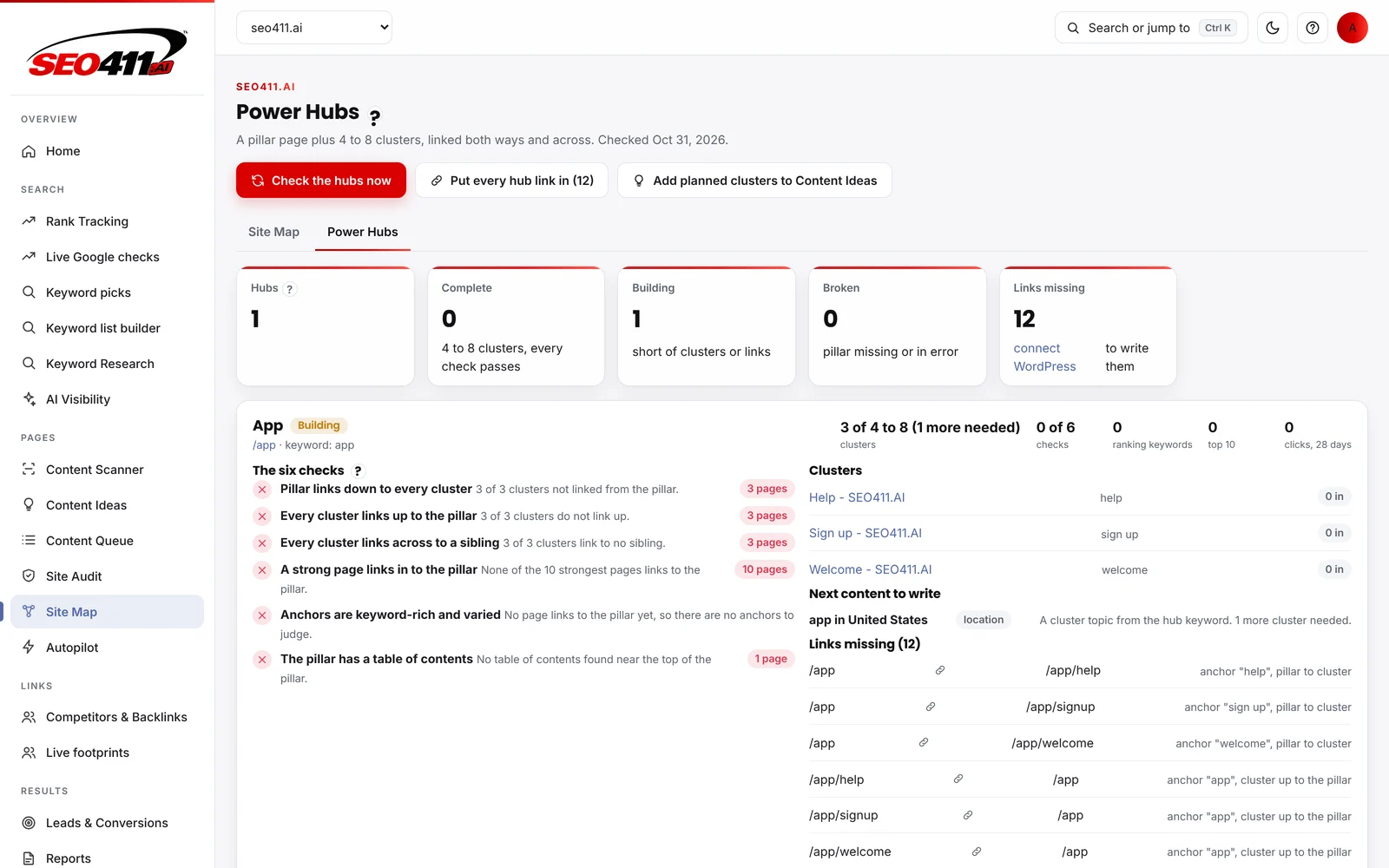
The Power Hubs tab
One hub, its clusters, the six checks with failing pages, the next content to write and the links missing.
THE SIX CHECKS
What every hub is checked for
These are the six checks the app runs on each hub, in order. Each one is a question about the content on a website and the user’s path through it, and each one has a pass or fail in the search results sense: Google either finds the link or it does not. Each one lists the pages that fail it, so the fix is a page and an anchor, not a paragraph of advice.
Pillar links down to every cluster
The pillar page carries a link to each cluster page under it. Clusters not linked from the pillar are listed by page.
Every cluster links up to the pillar
Each cluster page links back to its pillar in the body copy, not only in a menu, so the pillar collects the hub's authority.
Every cluster links across to a sibling
Clusters link to at least one other cluster in the same hub, so a reader and a crawler can move through the topic without going back to the pillar.
A strong page links in to the pillar
One of the site's ten strongest pages, by links in, points to the pillar. A hub no strong page links to starts from zero.
Anchors are keyword-rich and varied
The anchors pointing at the pillar carry the hub's keyword and vary in wording, instead of one phrase repeated or a bare click here.
The pillar has a table of contents
A link list near the top of the pillar with three or more links to sections on the same page, which is what long pillars need to be read in full.
HOW IT RUNS
From map to scorecard in five steps
The map rebuilds on its own every week on Sunday, or build it again after you add pages. The hubs are checked when the map is done.
01
Build the map
SEO411.AI reads up to 300 of your pages from WordPress or your sitemap, with titles, links in and out, and each page’s role: pillar, cluster or outside every hub.
02
Check every hub
Each hub is scored complete, building or broken against the 4 to 8 clusters it needs and the six link checks, with the failing pages listed under each check.
03
Put the links in
The missing links are listed with their page and anchor. Approve them and they are written on your pages through your WordPress connection.
04
Plan the missing clusters
A hub short of clusters names the next content to write. Add planned clusters to Content Ideas and the writer drafts each one already linked into its hub.
05
Report the scorecard
Weekly and monthly reports carry the Power Hub Scorecard: hubs complete, building and broken, links put in and clusters written, so clients see structure, not only rankings.
A REAL EXAMPLE
Our own site, the week we shipped it
The capture in the hero is SEO411.AI itself on October 27, 2026, right after the first map build: 31 pages read, one hub found, 27 pages outside every hub, 12 links missing. That is an honest picture of a site built page by page before the hub check existed, and it is the list we are working from now. The live rank tracking check will show what the links do to the positions.
Agencies run this on every client site from the agency workspace, and the scorecard goes into white label reports. Small business owners see the same screen with the next step named, on the small business SEO software plans.
TOPICAL AUTHORITY
Why cluster content beats one long page
Topical authority is a search engine’s reading of how completely a website covers a subject. One long guide covers a topic in one place; cluster content covers it in depth, with a pillar page on the subject and a cluster page on each subtopic, each answering one search intent fully. A user who lands on a cluster page from a long-tail search finds the pillar one click up and the sibling pages one click across, so the visit turns into a session and, on a service site, a conversion. Internal linking is what makes the group readable as a group: without the links, Google sees eight pages that happen to share words.
That is why the six checks are all about internal links and anchors rather than word counts. The strategy for a new hub is simple: pick the subject, write the pillar as the guide to it, then write 4 to 8 cluster pages, each on one subtopic and one intent (a how-to, a cost question, a comparison, a local version), and link every one of them up, down and across with anchors that carry the hub’s keyword in varied wording. Traffic to the hub grows as a group, and the pillar collects the ranking for the head term because every cluster passes authority up to it.
SEO411.AI does the bookkeeping. The map reads the hubs from the site, the checks say which link is missing, the writer knows the hub each page belongs to, and the keyword picker names the hub for every keyword with no page. For the reasoning behind the whole method, read the why SEO411.AI is different page; for the scanner that scores each cluster page against the pages ranking today, read the Content Scanner page.
THE PILLAR PAGE AND THE INTERNAL LINKING STRATEGY
What goes on the pillar page, and how the links are placed
The pillar page is the guide to the subject: the piece a visitor would read first, with a table of contents at the top, a section for each subtopic and a link from each section to the cluster page that covers it in full. It carries the head keyword and the brand’s own experience of the subject, the information a reader cannot get from a summary written by someone who has never done the work. Each cluster page is one article on one subtopic, written for one intent, and it links back to the pillar in its first screen of copy and across to the sibling it most belongs next to.
The internal linking strategy is the same on every hub, and that is what makes it checkable: links in the body copy, not only in menus or footers; anchors that carry the hub’s keyword in varied wording; one of the site’s strongest pages linking in to the pillar so the hub does not start from zero; and no cluster left as an orphan. On a WordPress site the app writes the approved links itself; on any other platform it lists each link with its page, sentence and anchor for the editor to place. The internal link strength tool on the SEO tools page ranks every page on the site from weakest to strongest by links in, which is how the strong page for each hub is chosen.
A topic cluster strategy only pays off when the process is repeated: the user who searches, the website that answers, the content that links. The results show up in the search results as a group, with the pillar page climbing for the head term while the cluster content takes the long-tail terms around it, and the content on each page getting more clicks because the user reaches it from a related page instead of a cold search. Keywords are chosen for the hub as a set: the head keyword for the pillar and a subtopic keyword for each cluster, from Keyword Research or the Sunday picks, so the content and the keyword list grow together and no two pages compete for the same term.
FAQ
Frequently asked questions
A Power Hub is a pillar page plus 4 to 8 cluster pages on the same topic, linked three ways: the pillar links down to every cluster, every cluster links up to the pillar, and every cluster links across to a sibling. SEO411.AI reads the hubs from your site map, checks each one, and names what is missing.
A topic cluster is the idea. A Power Hub is the idea with a definition you can check: a cluster count of 4 to 8, six link checks with a pass or fail each, keyword-rich and varied anchors, a strong page linking in and a table of contents on the pillar. The app scores every hub as complete, building or broken, so the next step is never a matter of opinion.
Pillar links down to every cluster. Every cluster links up to the pillar. Every cluster links across to a sibling. A strong page links in to the pillar. Anchors are keyword-rich and varied. The pillar has a table of contents. Each check lists the pages that fail it.
Yes, when you approve them. Put every hub link in lists each missing link with its page and anchor, and writes them on your pages through your WordPress connection. Nothing is written until you press the button, and the page keeps its other content as it is.
They are listed under Pages outside every hub with the hub each one belongs in, read from the page’s own keyword and links. You can move a page into a hub, or leave it; the writer knows each page’s hub either way.
A hub short of its 4 to 8 clusters shows the next content to write. Add planned clusters to Content Ideas sends those topics to the ideas list with the hub named, and the brief for each one is read from the hub’s own pages so the new page links into it from the first draft.
See your own hubs in the free demo
Add your site, build the map and read the six checks on your own pages. The demo opens the full workspace with sample data and 5 real Content Scanner scans.
Related pages
- Features tour: Every module of the platform, screen by screen
- All in one SEO tools: Each tool and the decision it helps you make
- Content scanner: Link suggestions with the exact sentence and anchor
- Live rank tracking: Positions from a live check of today’s Google
- AI search optimization: How the platform helps pages get picked by AI answers